Product Overview
AVA is a self-hosted, real-time helpdesk chat product with native Datto AutoTask PSA integration, built for MSPs by Aixtek Automation Labs. Your clients open a lightweight standalone chat page; an AI triage pass classifies the request and opens an AutoTask ticket automatically; your engineers answer from a live dashboard secured by Microsoft Entra ID (O365) single sign-on. When a chat ends, the engineer's wrap-up flow writes the transcript, notes, a billed time entry, and the final ticket status straight back into AutoTask.
It runs as one Node.js process in a single Docker container (Next.js 16 + Socket.io + SQLite) — no Redis, no external database, no separate workers. The app itself runs in a ~250 MB footprint; a 1 vCPU / 2 GB host is comfortable for a typical helpdesk, and a 2 vCPU / 8 GB host leaves plenty of headroom.
Everything that identifies the deployment to your clients — company name, logo, support phone, welcome message, business hours, timezone, AutoTask picklist IDs, and even the AI provider — is configured entirely through environment variables. There is no per-tenant code fork. Out of the box AVA presents a neutral identity ("Your Company", the AVA logo); you overlay your own MSP identity with a handful of env vars (see white-label.md).
The three surfaces
1. Client chat page (no login)
A standalone, mobile-friendly page your clients reach via any link — many MSPs surface it through an RMM systray shortcut. No client account, no embeddable widget to install. The page:
- Shows a short contact form (name, email, phone, description).
- Is gated by Google reCAPTCHA v3 (invisible) and a per-IP rate limit (3 sessions/hour).
- Respects configurable business hours — outside your open window it shows an after-hours state with an email-a-ticket fallback instead of a live queue.
- Streams the live conversation over WebSocket, with queue position while waiting, typing indicators, engineer presence, file attachments (5 MB, type-allowlisted), and a satisfaction survey when the chat closes.
2. Engineer dashboard (Entra ID SSO)
A real-time console for your helpdesk team, gated by Microsoft Entra ID. An engineer can only sign in if they are a member of the Entra security group you designate (see first-login.md). Feature areas:
- Live queue & active chats — the waiting queue with per-session wait timers and aging cues (fresh → warm → hot), a standby screen when idle, and a per-engineer concurrent-chat cap (
MAX_ACTIVE_SESSIONS, default 2). - AI triage context — every incoming chat arrives pre-classified with a priority (P1–P4), an AutoTask issue category, and a one-line summary, so the engineer opens the conversation already knowing the topic.
- Slash commands — type
/in the reply box for a keyboard-driven menu:/draft,/rewrite,/summarize,/note,/status,/priority,/ticket,/history,/device,/transfer,/wrapupand/help. - Internal notes — a Reply | Internal note toggle. Notes are visible to your team only, are posted to the AutoTask ticket as Internal Only notes, and are never shown to the client.
- Ticket status & priority in the chat — see the live AutoTask status and priority and change them after a confirmation, without leaving the chat.
- AI helpers for engineers — a suggested reply, a tone rewrite of your draft, a private recap of the chat, and one-click drafts of the wrap-up notes. Suggestions are always reviewed by the engineer; nothing is sent automatically.
- Wrap-up flow — an in-rail panel where the engineer picks the final ticket status, reviews/edits the billed time (auto-computed from chat duration, quarter-hour rounded, midnight-spanning aware), and on submit writes the time entry, client-facing + internal + resolution notes, transcript, file attachments, and final ticket status back to AutoTask.
- Transfer — hand a live chat to another available engineer.
- Snippets (canned responses) — team-wide and per-engineer saved replies with optional
/shortcutsand{{placeholders}}(client name, ticket number, …); managed on a dedicated page. - Command palette & shortcuts —
⌘K/Ctrl-Kfor keyboard-driven navigation and actions, chat-switching hotkeys, and a?shortcut reference. - Archives search — full-text search across closed sessions.
- Analytics — a volume dashboard with pickup / first-reply / resolution times (avg · median · p90), CSAT from surveys, and per-engineer + per-org leaderboards, over 7d / 30d / 90d / custom ranges.
- Surveys — post-chat satisfaction ratings, browsable and filterable in the dashboard, with an optional weekly survey report emailed out.
- Availability & profile — each engineer toggles their own online/away status and light/dark theme.
- Device glance (optional) — if you pair AVA with a NinjaOne RMM tenant, the chat's context panel shows a read-only "device at a glance" card for the client's machine (online status, disk, patches, antivirus, IPs, last logged-on user, recent alerts) — auto-resolved from AutoTask Configuration Items and/or the NinjaOne API, with a one-click "Open in NinjaOne" deep link. Fully config-gated: with no
NINJAONE_*env set, the panel behaves exactly as if the feature didn't exist. Seeconfiguration.md.
For a walkthrough of the console (slash commands, internal notes, snippets, AI helpers, ticket editing, shortcuts and wrap-up), see engineer-console.md.
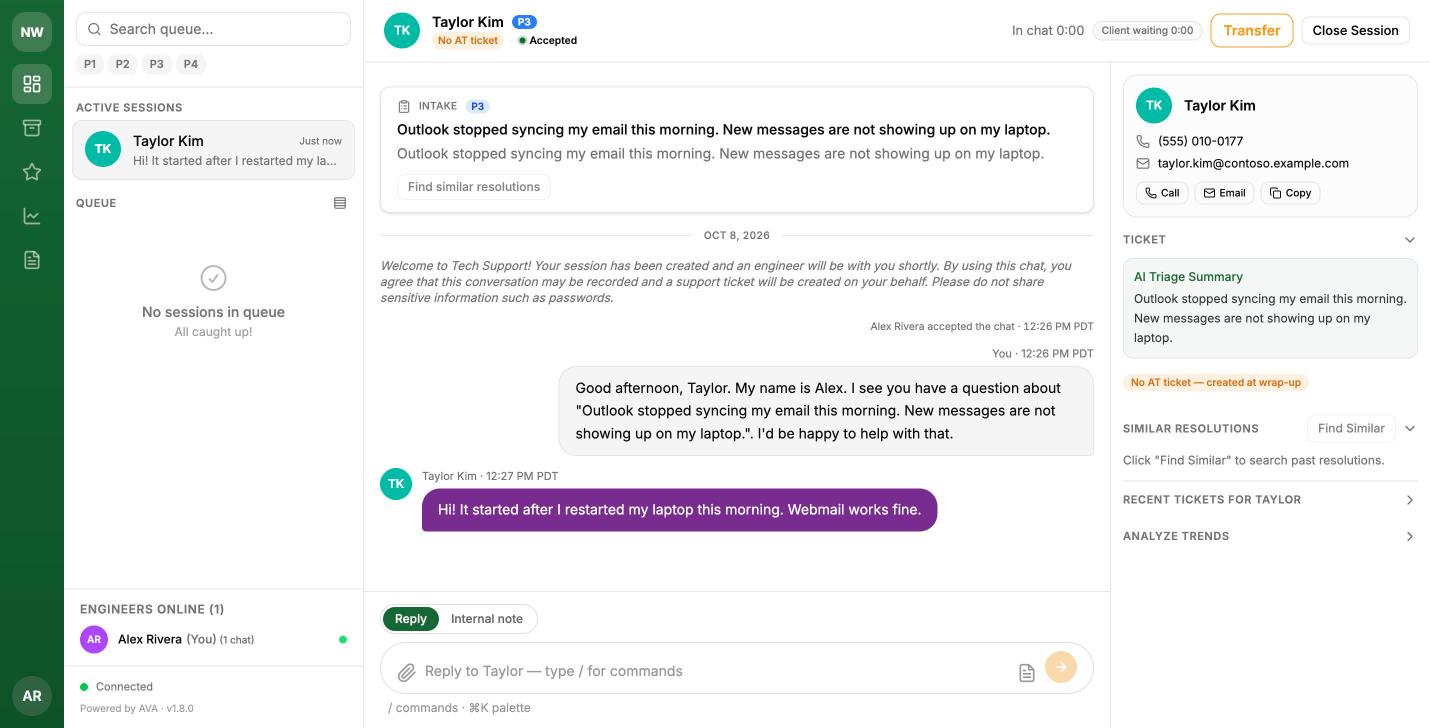
An active chat: the Intake card, the transcript, the client's contact card, and the Reply / Internal note toggle. (Fictional demo brand and clients; the demo had no PSA connected, so it shows "No AT ticket" instead of a ticket number.)
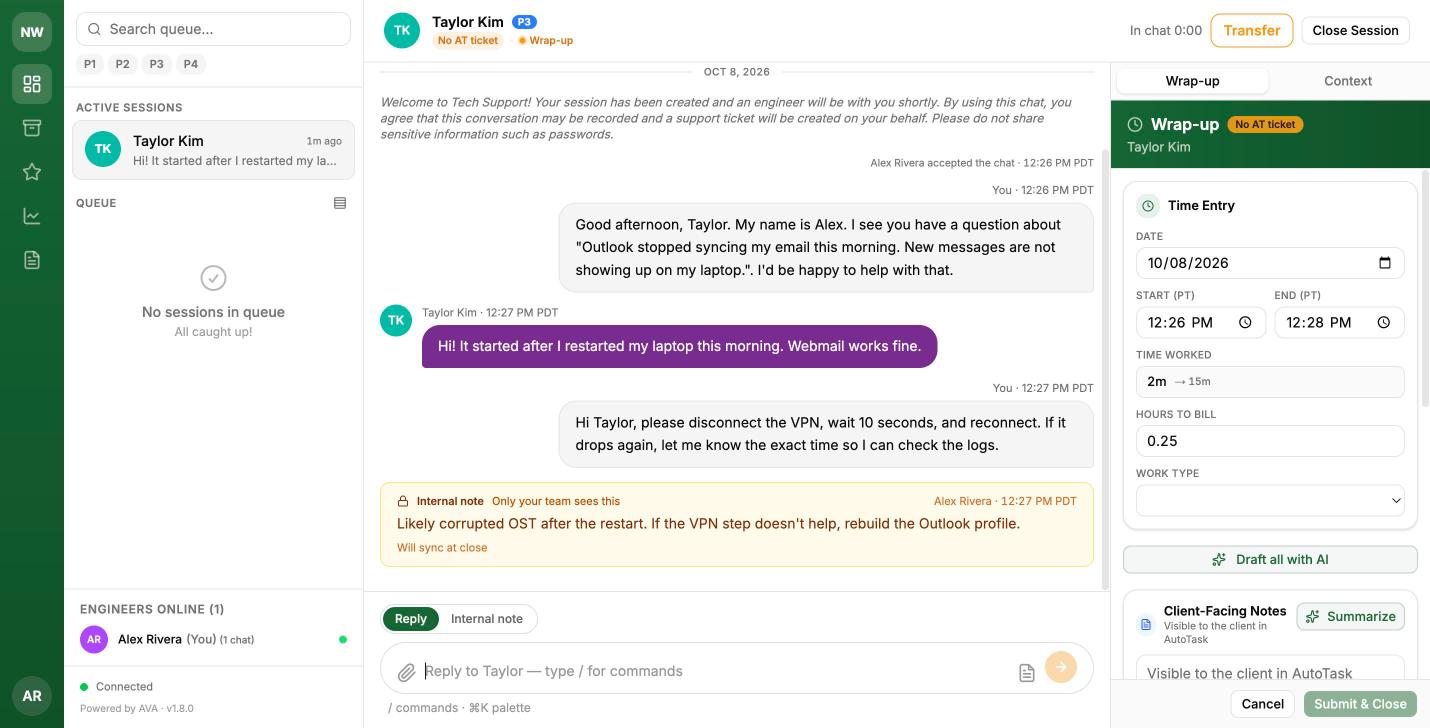
Wrap-up: the time entry, AI-drafted notes and the final ticket status, all written back to AutoTask on submit.
3. AutoTask integration (server-side)
All AutoTask calls are server-side using the AutoTask REST API v1.0. AVA:
- Matches the client's email domain to an AutoTask Company (exact / subdomain preferred over substring, so lookalike domains don't misfile), finds or creates the Contact, and opens a Ticket with your default status / priority / queue / source / type picklist values.
- Falls back to a configurable catchall company for personal-email domains (Gmail, etc.) so a chat is never stranded without a ticket.
- During the chat, posts engineers' internal notes to the ticket (Internal Only) and applies status/priority changes engineers confirm in the console.
- On close, posts a TimeEntry, TicketNotes (client-facing + internal), the full transcript as its own note, and any Attachments, then sets the resolution and final status.
- Links ticket numbers in the dashboard to your AutoTask web UI.
- Maps each engineer's O365 email to an AutoTask Resource on first login so time entries attribute to the right person.
AI layer — provider-agnostic
Triage classification, similar-resolution hints, trend summaries, the engineer helpers (/draft, /rewrite, /summarize, "Draft all with AI"), and the close-time summary all run through the Vercel AI SDK behind two env-selected model tiers, LLM_FAST and LLM_QUALITY. The defaults use Anthropic (Claude Haiku for the fast tier, Claude Sonnet for quality); switching to OpenAI, Google Gemini, or OpenRouter is a one-line env change plus that provider's API key. AI inputs are length-capped, engineer AI usage has configurable per-chat and per-engineer limits, and every AI call degrades gracefully — a failed triage files the ticket at normal priority rather than blocking the chat. See ai-providers.md.
White-label by design
Deployment identity is layered on at runtime, not baked in:
- Identity & copy — company name, descriptor, monogram, tagline, logo path, welcome message, support phone (hidden entirely when unset), client portal link (hidden when unset).
- Locale — business hours (timezone, open/close hours, open days) and a display timezone for all human-facing timestamps.
- AI voice — the clientele-profile sentence fed to the triage prompt.
- All email endpoints — sender and recipient addresses are explicit configuration with no vendor fallback; mail is never silently sent to a default address.
See white-label.md for the full checklist and configuration.md for every variable.
Security posture at a glance
- Engineer dashboard behind Entra ID SSO with a fail-closed group check; server-side OAuth (the browser never holds Azure tokens), signed HttpOnly session cookies (HS256, 24 h expiry), and a boot-time strength check on the signing secret (≥ 32 chars, placeholder values rejected).
- WebSocket connections are authenticated before they are admitted, and are rate- and size-limited.
- Public form gated by reCAPTCHA v3 (fail-closed in production) plus per-IP session and upload budgets.
- Uploads are size- and type-restricted, content-verified, quota-bounded, and retained only for a configurable window.
- Internal notes and other engineer-only content are never shown to the client.
- Container hardening in the shipped production template: all Linux capabilities dropped, read-only root filesystem,
no-new-privileges, memory cap, log rotation; nginx template ships CSP, HSTS, and the other security headers pre-configured. - All PSA/RMM/AI credentials live in a root-owned host config file mounted read-only into the container — never in the image, never in the browser.
Where to next
requirements.md— everything to provision first: AutoTask API user, Entra app registration + security group, reCAPTCHA v3 keys, SMTP2GO account, Docker host.quickstart.md— from clone to the app running locally.production-deployment.md— the production stack: nginx + TLS auto-renewal, host config mount, upgrades.first-login.md— engineer onboarding and the end-to-end smoke test that proves the AutoTask round-trip.configuration.md— the complete environment-variable reference.white-label.md— rebranding the deployment as your own.engineer-console.md— the day-to-day guide for your engineers.
Updated 15 days ago